> For the complete documentation index, see [llms.txt](https://help.paintscout.com/llms.txt). Markdown versions of documentation pages are available by appending `.md` to page URLs; this page is available as [Markdown](https://help.paintscout.com/support/operations/deals/job-costing.md).
# Job Costing
Track labor, materials, and other expenses on Production deals to measure total costs and profitability.
{% hint style="danger" %}
**Important:** this feature requires the paid **Operations add-on.**
{% endhint %}
## What is Job Costing?
Job costing is the process of tracking all expenses—labor, materials, and overhead—for an individual painting project to determine its true profitability.
In PaintScout, you can track the expenses associated with each job directly within your Production deals. As work progresses, log and update costs in real time to keep a clear picture of where your money is going on every job.
***
## Where to Find Job Costing
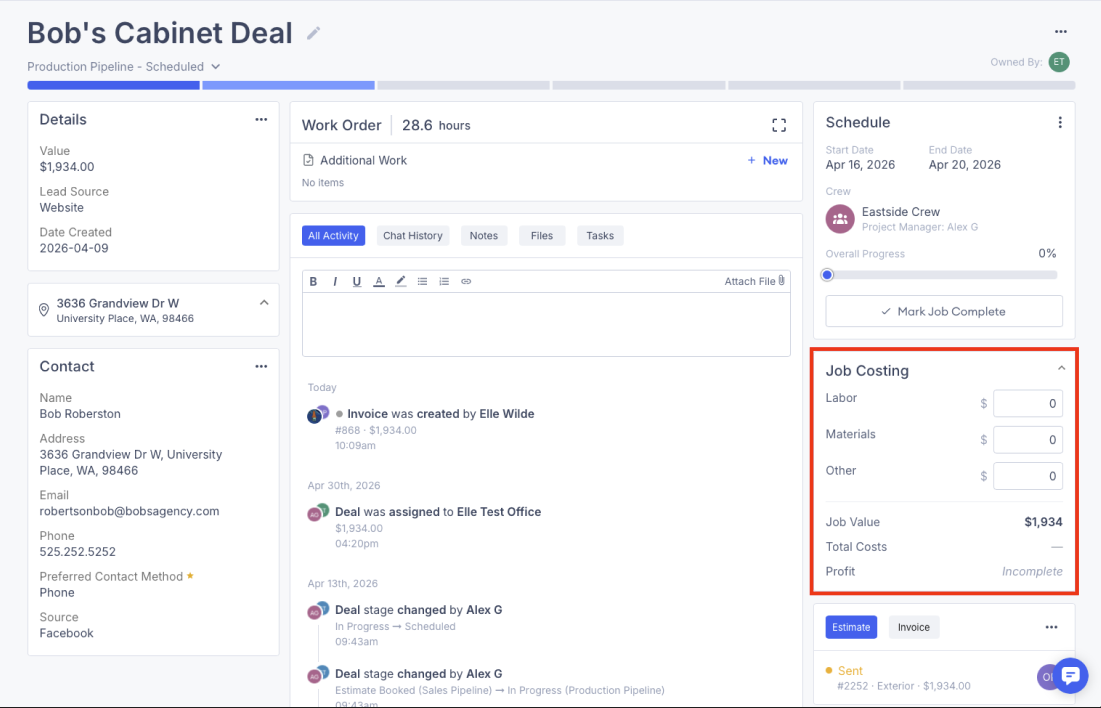
Job Costing lives on the **Production deal page**. Open any deal in your Production pipeline and you'll find the Job Costing card on the right-hand side.
***
## Logging Costs
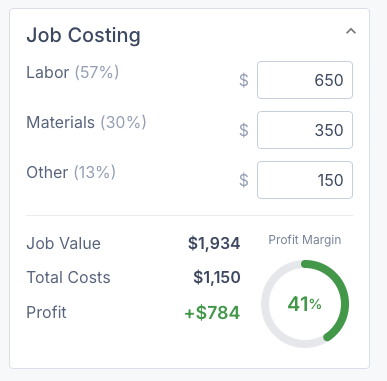
Costs are split into three categories:
* **Labor:** wages, subcontractor costs, or any people-related expenses
* **Materials:** paint, supplies, and any other materials used on the job
* **Other:** anything that doesn't fit neatly into the above two categories
To log a cost:
1. Open the **Production deal**
2. Find the **Job Costing** card
3. Enter an amount under **Labor, Materials,** or **Other**
4. The totals update automatically
5. Click **Save**
Costs can be updated at any time throughout the lifecycle of the job — there's no need to enter everything at once.
***
## Understanding the Numbers
|
Field
|
What it means
|
| -------------------------------- | ------------------------------------------------------------------------------- |
| **Job Value** | The pre-tax job value, pulled from the linked estimate or invoice |
| **Labor** | Total labor costs logged |
| **Materials** | Total materials costs logged |
| **Other** | Any other costs logged |
| **Total Costs** | The sum of Labor + Materials + Other |
| **Profit %** | Job Value minus Total Costs — shows as incomplete until costs have been entered |
{% hint style="info" %}
If you want to attach receipts or supporting documents to a job, add them to the **Files** section on the deal rather than the Job Costing card directly.
{% endhint %}
***
## Who Can See Job Costing
* **Sales users** can view and edit job costing on any Production deal they have access to.
* **Team users** can view and edit job costing on Production deals.
* **Painter users** cannot see the Job Costing card — it is hidden from their view regardless of permissions.
***
## A Few Things to Know
* Job Costing is only available on **Production deals** — it does not appear on Sales deals.
* Costs are entered **manually** — there is no automatic syncing from invoices or payments.
* Job Value is pulled from the linked estimate or invoice before tax, so it may differ from the Deal Value shown elsewhere on the deal.
* Job Value cannot be edited from the Job Costing card directly.
* Profit will show as **incomplete** until at least one cost has been entered.
***
## Job Costing Report
Once you've been logging costs across your jobs, you can get a full picture of costs and profitability across your account through the **Job Costing Report**.
The report pulls together job value, total costs, and profit across all your Production deals so you can compare cost patterns, monitor margin trends, and make more informed decisions about pricing and resourcing.
For a full breakdown of what's in the report and how to use it, see [Job Costing Report](/support/dashboard-and-reports/reports/job-profitability-report.md).
---
# Agent Instructions
This documentation is published with GitBook. GitBook is the documentation platform designed so that both humans and AI agents can read, navigate, and reason over technical content effectively. Learn more at gitbook.com.
## Querying This Documentation
If you need additional information that is not directly available in this page, you can query the documentation by asking a question.
Perform an HTTP GET request on the following URL with the `ask` and `goal` query parameters:
```
GET https://help.paintscout.com/support/operations/deals/job-costing.md?ask=&goal=
```
`ask` is the immediate question: it should be specific, self-contained, and written in natural language.
`goal` is what the user is ultimately trying to achieve, the reason they need the answer. Sharing it helps GitBook give you a better, more relevant answer. A goal is most helpful when it describes the outcome the user wants rather than restating the question. For example, with `ask=how do I create an API token`, a goal like `automate deployments from our CI pipeline` lets GitBook tailor the answer to that use case.
The response will contain a direct answer to the question and relevant excerpts and sources from the documentation.
Use this mechanism when the answer is not explicitly present in the current page, you need clarification or additional context, or you want to retrieve related documentation sections.