> For the complete documentation index, see [llms.txt](https://help.paintscout.com/llms.txt). Markdown versions of documentation pages are available by appending `.md` to page URLs; this page is available as [Markdown](https://help.paintscout.com/support/operations/deals/deal-stages.md).

# Deal Stages

Deal stages in PaintScout are the customizable steps in your sales and production pipelines. They show where a job sits from lead request through completion.

{% hint style="danger" %}
**Important:** this feature requires the paid **Operations add-on.**
{% endhint %}

***

## How Do I Customize Deal Stages?

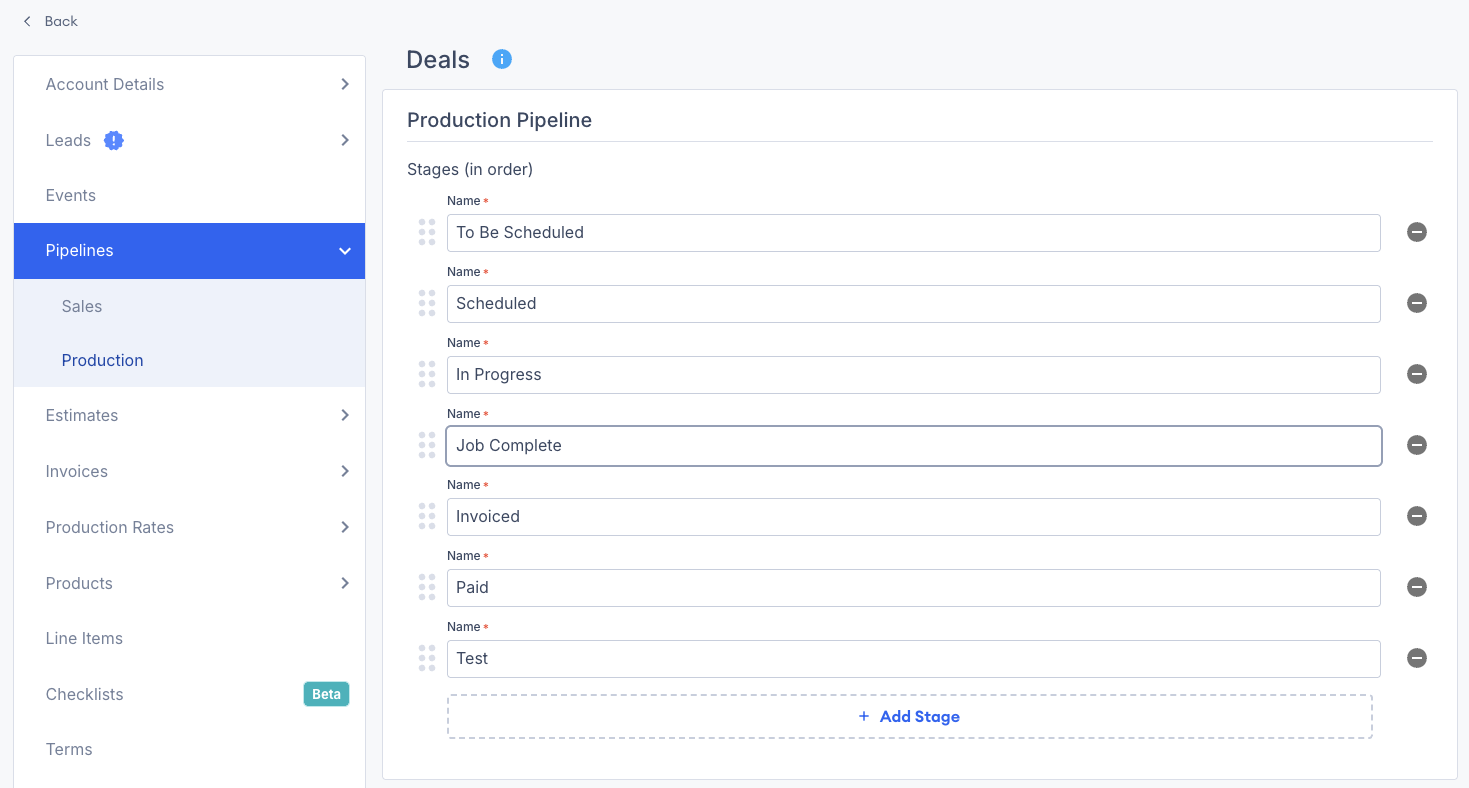
1. Go to **Account** **Settings** > **Pipelines.**
2. Select **Sales** or **Production.**
3. Click **Add Stage**.
4. Enter the details for your new stage:
   * **Stage Name** — a clear label, such as "Estimate Sent" or "Scheduled".
   * **Stage Order** — drag and drop stages into the right order.

<figure><img src="/files/xqRvwfuG1cYnJgO8Ur3U" alt="Screenshot showing the Deal Stages settings page with stage names and drag-and-drop ordering"><figcaption></figcaption></figure>

***

## Best Practices for Deal Stages

* Keep stage names **short and action-oriented**.
* Match stages to **major workflow milestones**.
* Avoid too many stages. Keep the pipeline easy to scan.

{% hint style="info" %}
**Pro tip:** Review your deal stages regularly. Updated stages keep your pipeline and reporting accurate.
{% endhint %}

***

## Related articles

* [All Deals Report](/support/dashboard-and-reports/reports/all-deals-report.md) — View pipeline health, deal stages, types, and value breakdowns
* [Deal Tag Summary Report](/support/dashboard-and-reports/reports/deal-tag-summary-report.md) — Analyze deal performance by tag


---

# Agent Instructions
This documentation is published with GitBook. GitBook is the documentation platform designed so that both humans and AI agents can read, navigate, and reason over technical content effectively. Learn more at gitbook.com.

## Querying This Documentation
If you need additional information that is not directly available in this page, you can query the documentation dynamically by asking a question.

Perform an HTTP GET request on the current page URL with the `ask` query parameter:

```
GET https://help.paintscout.com/support/operations/deals/deal-stages.md?ask=<question>
```

The question should be specific, self-contained, and written in natural language.
The response will contain a direct answer to the question and relevant excerpts and sources from the documentation.

Use this mechanism when the answer is not explicitly present in the current page, you need clarification or additional context, or you want to retrieve related documentation sections.