> For the complete documentation index, see [llms.txt](https://help.paintscout.com/llms.txt). Markdown versions of documentation pages are available by appending `.md` to page URLs; this page is available as [Markdown](https://help.paintscout.com/support/operations/automations.md).

# Automations

Automations let you streamline your workflow by triggering stage changes based on real events — like when an estimate gets accepted or an invoice is marked as paid.

{% hint style="danger" %}
**Important:** this feature requires the paid **Operations add-on.**
{% endhint %}

***

## How to Create an Automation

1. Click the **person icon** in the top right and choose **Account Settings**
2. Go to the **Automations** section
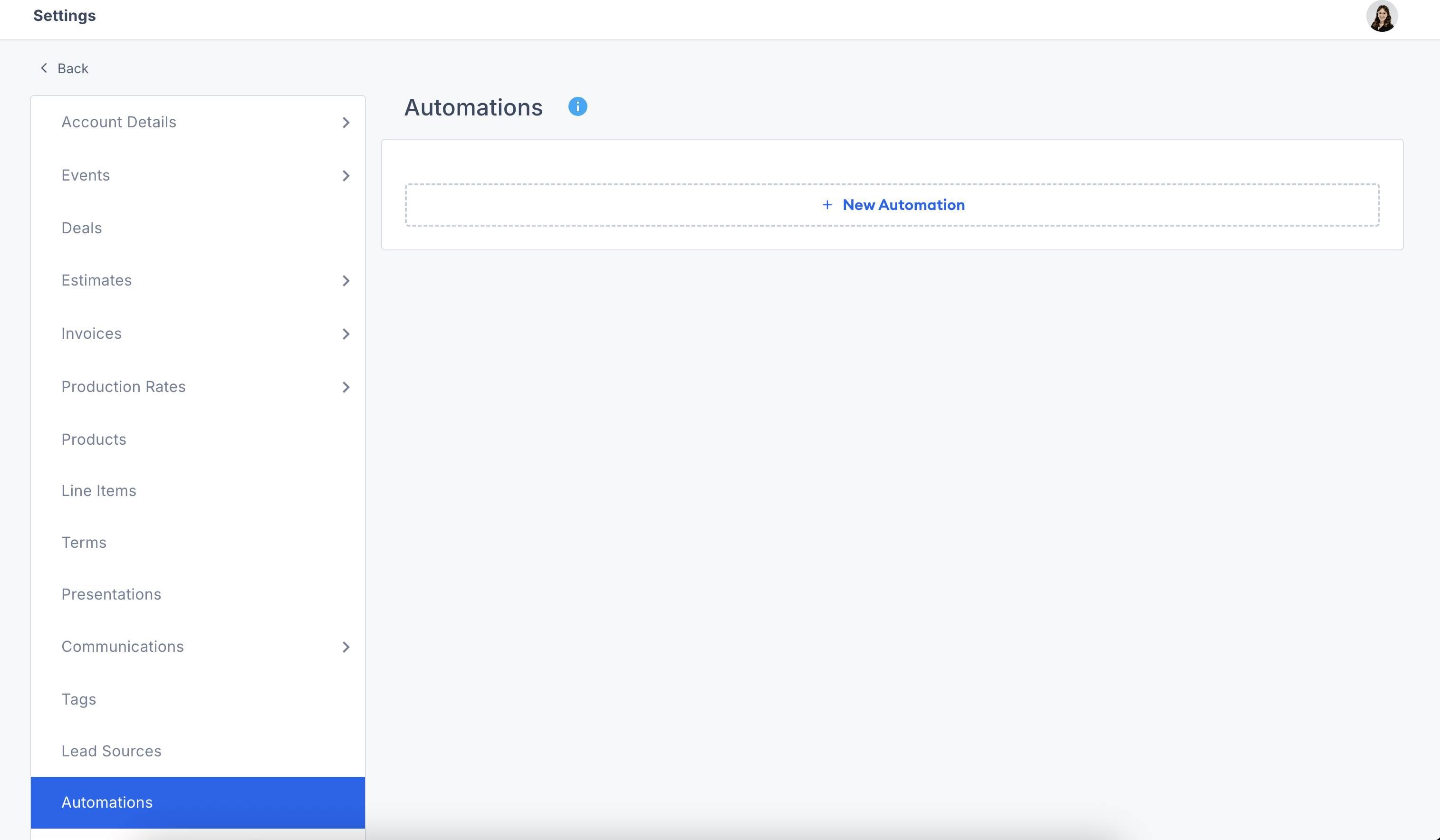
3. Click the **+New Automation** button

   <figure><img src="/files/ySFyu2guedESBAIEg1rz" alt="Screenshot showing the New Automation button in Account Settings"><figcaption></figcaption></figure>
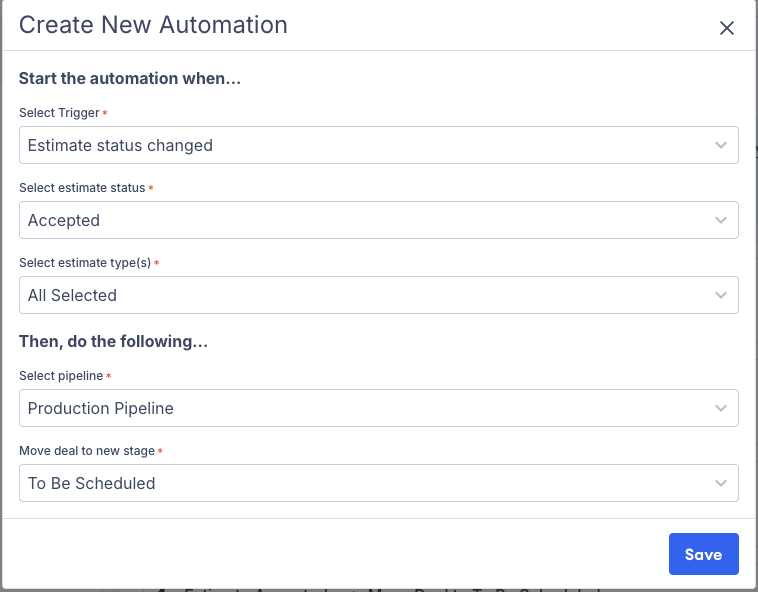
4. Select your trigger and action criteria.

   <figure><img src="/files/1bIgY3ACrKpruFAOL9QE" alt="Screenshot showing the automation trigger and action configuration dialog"><figcaption></figcaption></figure>
5. Once saved, your automation will be enabled and you can rename it if you would like.

<figure><img src="/files/F4Nk99mJPrkRRP7D8STH" alt="Screenshot showing a saved automation with the option to rename it"><figcaption></figcaption></figure>

***

## ⚠️ Troubleshooting

* **Deleting a deal stage used in an automation will break it.**\
  If an automation points to a stage that no longer exists, it won't run—and you'll need to update or remove it.

<figure><img src="/files/LlhBtliLZtcQzeTjtLfj" alt="Screenshot showing a broken automation caused by a deleted deal stage"><figcaption></figcaption></figure>

* **If a deal isn't moving:**
  * Make sure the automation is still active
  * Double-check that the estimate or invoice status actually changed
  * Confirm the destination stage still exists

## Related articles

* [Operations Guide](/support/operations/crm/paintscout-crm-guide.md) — See how automations fit into the full Operations workflow
* [Operations FAQ](/support/operations/crm/crm-faq.md) — Find answers to common questions about deals, jobs, and calendars


---

# Agent Instructions
This documentation is published with GitBook. GitBook is the documentation platform designed so that both humans and AI agents can read, navigate, and reason over technical content effectively. Learn more at gitbook.com.

## Querying This Documentation
If you need additional information that is not directly available in this page, you can query the documentation dynamically by asking a question.

Perform an HTTP GET request on the current page URL with the `ask` query parameter:

```
GET https://help.paintscout.com/support/operations/automations.md?ask=<question>
```

The question should be specific, self-contained, and written in natural language.
The response will contain a direct answer to the question and relevant excerpts and sources from the documentation.

Use this mechanism when the answer is not explicitly present in the current page, you need clarification or additional context, or you want to retrieve related documentation sections.
