Invoicing FAQ
Answers to common questions about creating, editing, and managing invoices in PaintScout.
Last updated
Was this helpful?
Answers to common questions about creating, editing, and managing invoices in PaintScout.
Depending on your settings, Create Invoice may only appear for accepted estimates.
Yes. The invoice captures the estimate at creation time. Later changes do not sync between documents.
Approved additional work transfers to the invoice. You can also create additional work before creating the invoice.
No. Each estimate creates one invoice. Use payment requests for deposits or progress payments.
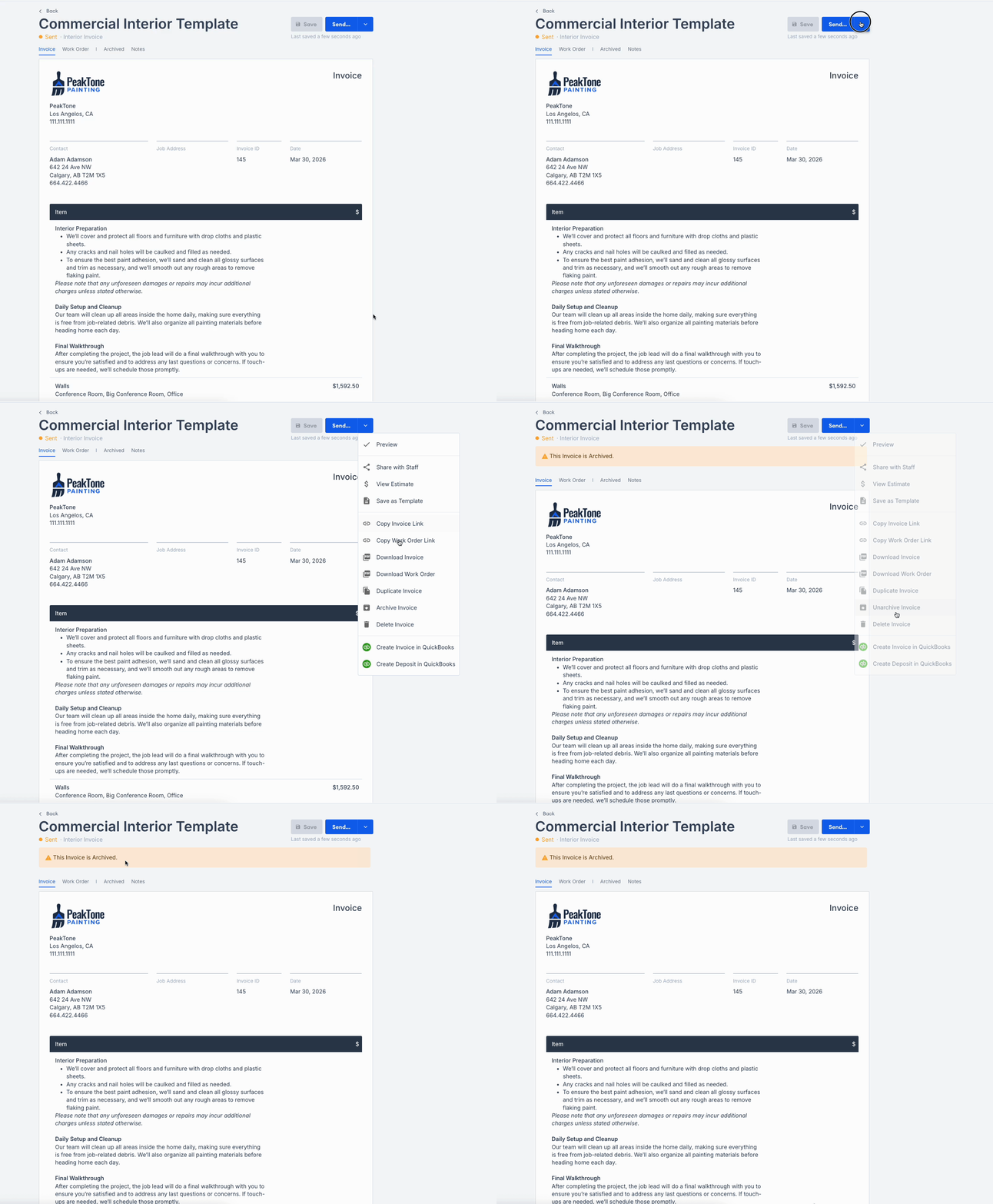
Yes. Archiving removes an invoice from your active list. It remains available in reports and can be reactivated.
On the invoice, open the dropdown beside Send.
Select Archive Invoice.
Confirm the archive banner appears.

Create and Send an Invoice — Create an invoice from an accepted estimate and email it to your customer.
Invoice Settings — Configure due dates and automatic invoice generation.
All Invoices Report — Review invoice status, payments, and cash flow.
Last updated
Was this helpful?
Was this helpful?

